Finsumo
Features
Everything Finsumo does today, stated in full — not the highlights, the complete list. Every feature below says what it does and shows a worked example with real numbers. Every fact here is true of Finsumo as it's built; nothing on this page is a plan for later.
What it is
Finsumo is a native iPhone and iPad app, built for iOS 26 and iPadOS 26 or later, that records what you spend and earn across several currencies — fiat, stablecoins and Bitcoin — in one ledger, and reads a clean total back in whichever of them you're thinking in. It asks for no account and no sign-in: everything you enter lives in the app's own on-device database, and the only traffic Finsumo generates is looking up exchange rates, never anything about your transactions. The one exception is iCloud sync, which is always on and uses only your own private iCloud.
It's free to use, for good, for tracking in one currency of your choice. Finsumo Pro, an optional auto-renewing subscription, adds the parts that involve more than one currency at once, plus a spending forecast — see "What it costs" at the end of this page for exactly what that means.
The rate that never moves
Most expense trackers keep one running number per currency and re-price your entire history every time that currency's rate moves, or every time you change which currency you view your spending in. Finsumo doesn't. Every entry keeps the exchange rate it was made at, permanently, so a total from months ago reports the exact same number today, next year, and in a currency you haven't even switched to yet.
How a rate freezes at entry
Say you pay ฿1 850 for dinner at a market stall in Bangkok. The moment you save that entry, Finsumo looks up that day's baht exchange rate and locks in what it converts to — $49.95, in this example — as the permanent record of what you spent. The ฿1 850 you actually handed over is kept too, so viewing that same entry back in Thai baht later always shows ฿1 850 exactly, to the last decimal.
Months later, curious what that dinner looks like in euros, you switch your display currency. Finsumo doesn't ask "what's $49.95 worth in euros right now" — today's EUR/USD rate never enters into it. It asks what the euro was worth against the dollar on that specific day in Bangkok, and answers with that: €46.25. Come back again next year, after the euro has moved a long way against the dollar, and it's still €46.25 — because the question Finsumo answers is always "what did this cost, on the day it happened," never "what would it cost if I paid today."
No signal, no problem
Recording an expense never waits on a network connection. Enter a ฿1 200 taxi fare with your phone in airplane mode and Finsumo uses the last baht rate it has cached — say 0.0271, giving $32.52 — and quietly flags that entry as using a stand-in rate. Once you're back online, it looks up the true historical rate for that exact date — maybe 0.0269 this time — and corrects the frozen value to $32.28, once. After that correction the number is final: Finsumo never revisits it again, even if an even more accurate rate turns up later.
Current rates also refresh whenever you come back to the app, not only when it launches.
A payment in a stablecoin or in US dollars skips all of this — it's pinned at roughly 1:1 with the dollar by definition, so it needs no rate at all and is exact and final the instant you save it, online or not.
That correction happens on its own, the next time Finsumo is online. Finsumo Pro adds a manual version of the same check — "Update historical rates" in Settings — for forcing it right now instead of waiting, handy right after a Money Manager import brings in a run of older entries at once.
Rate quality, shown not hidden
Finsumo never quietly substitutes today's rate for one it couldn't find. Instead, each amount you see carries a small, honest mark for how it was priced:
| What you see | What it means |
|---|---|
| The number, unmarked | Priced from a real rate recorded for that exact day, or the currency needs no market rate at all (US dollars, stablecoins). |
| ~ before the number | Either the closest available historical rate stood in permanently, or Finsumo is still fetching the real one. |
| — in place of the number | No rate could be found yet for that currency, typically while fully offline with nothing cached. |
One more honest detail: the figures next to each category in a period may not visually add up to the printed total to the last cent. The total is computed from full-precision values and rounded once at the end, rather than by adding up rows that were each rounded first — the rows are a touch less exact than the total they belong to, not the other way around.
A rate you set yourself
Any entry names its own currency and rate
Every transaction's detail screen names the currency it was actually recorded in and the exchange rate frozen for it at entry, and says how exact that rate is — a real historical rate, an approximation, or still pending, the same three states described above, right on the entry itself. For a hand-typed exchange, the detail screen adds a dedicated field for that deal: what was actually paid and what was actually received, each in its own currency, alongside the transaction's own frozen value.
For the deal that wasn't at the market rate
A kiosk exchange, a hand-negotiated cash trade — sometimes the rate you actually got has nothing to do with the market one Finsumo would otherwise look up. Finsumo Pro lets you record both sides of a trade like that by hand: what you paid and what you actually received, each in its own currency, instead of a single converted amount. Say you hand over $500 and walk away with ฿16 800 from a currency stall — Finsumo keeps $500 and ฿16 800 exactly as typed, forever, whichever of the two currencies you look at the entry in; nothing reconciles either side back to that day's market rate afterward.
Because an exchange like this is quoted for exactly one pair, changing either currency involved clears it — there's no such thing as a hand-typed rate for a currency you haven't specified both sides of.
One currency setting, as many lenses as you like
Switch the lens, not the ledger
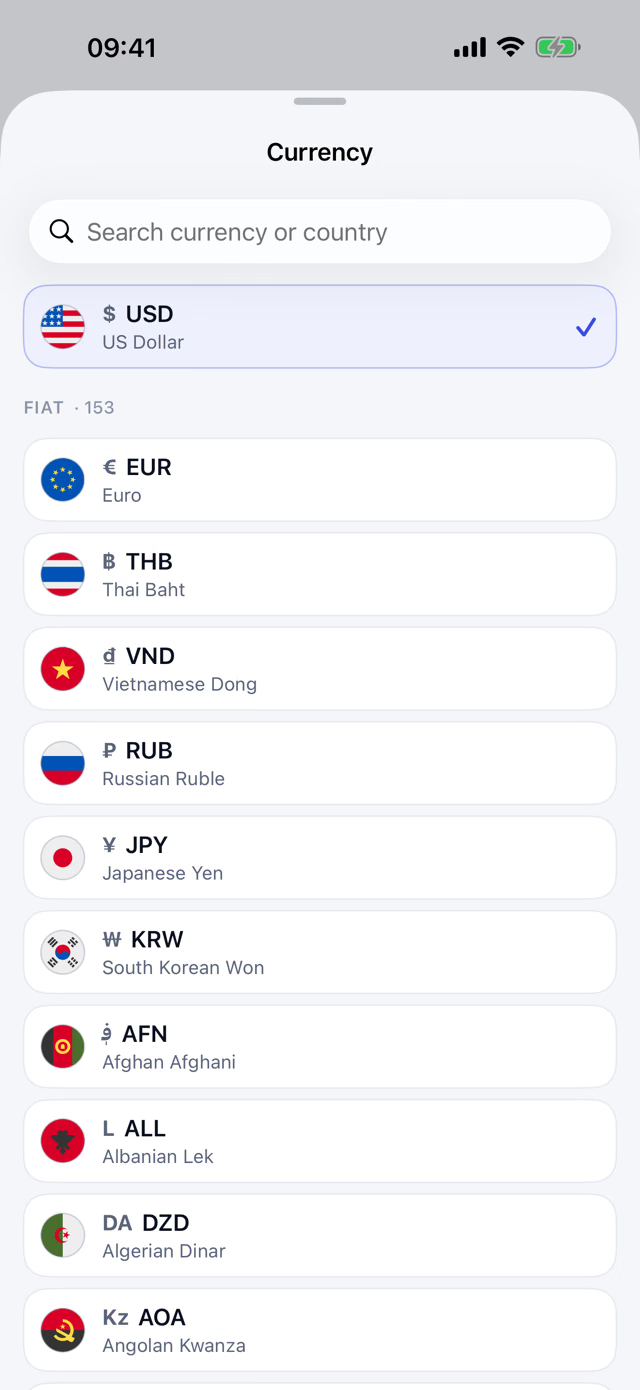
Home shows one period's spending as a total, a donut chart, and a list of categories with their share of it, all in one active currency. Tap the currency at the top of Home, or open the same picker while adding a transaction — either one changes the exact same setting, so a currency picked in one place is already in effect the next time you open Home or add a transaction. Picking any fiat currency — dollars, euros, baht, rubles, whatever you actually think in — is free, from either place, with no limit on how much history or how many periods you look at. Finsumo Pro is needed for exactly one further step: making Bitcoin, a stablecoin, or another cryptocurrency your active currency instead, grouped into Fiat, Stablecoins and Crypto in that same picker. Pick one of those and Home, the donut, and every category's percentage all re-read through it — the currency stays visible and tappable in the picker either way, since seeing it there is part of what shows what Pro adds.
That picker is one searchable list: 153 fiat currencies, each with its national flag, plus 15 dollar stablecoins and 84 cryptocurrencies — Bitcoin, Ethereum, Solana, Zcash, Dash and the biggest coins by market cap. Search by currency code, by name in any of the app's seven languages, or by country.
On a fresh install Finsumo starts in your device's own currency — US dollars if the app doesn't support it — so there is no setup question to answer first. You can change it anytime from the currency button on Home or in Settings.
Because each transaction is re-priced through its own date's rate for the new currency rather than through one blanket rate for the whole period, a category's percentage share can shift by a hair when you switch currencies, if the transactions inside it span days when exchange rates moved differently against each other. It's a small effect, and it's the honest one — the alternative would be pretending every transaction in the month happened on the same day.
An average per day, and a forecast
Under the period total, Home shows what you spend (or earn) per day on average across the week, month, year or custom range you're looking at — free. While the current week, month or year is still running, Finsumo Pro adds a forecast of where it will end at your current pace, with a small "i" that explains it's an approximate estimate. Both follow your active currency and the expense or income tab; the forecast is hidden for past periods and custom ranges, and neither appears on the single-day view.
Numbers that read the same in every language
Finsumo is available in English, Spanish, German, French, Russian, Japanese and Korean.
The button at the top left of Home shows the flag and code of the language in use; tap
it to change the app's language without opening Settings. Amounts don't follow
whichever language your phone is set to. Type an amount however you're used to writing it — 1200,50
and 1200.50 both mean exactly the same value, since Finsumo treats either a
comma or a dot as the decimal point. What you see back is always written the same
way — a period for the decimal point, a thin space between thousands, e.g.
1 200.50 — no matter which language the app is displaying its menus in.
Dates are the one exception: those still follow your chosen language normally.
A "Round to integer" setting, on by default, drops the cents from what you see: expenses round up to the next whole unit, income rounds to the nearest one. It's purely a display choice — turning it off, or back on, never touches the frozen value underneath.
This month against last
The same categories, two periods, side by side
A dedicated comparison screen — free, no Finsumo Pro needed — sets the current period against the matching one before it: this month against last month, broken down category by category, with both the amount change and the percentage change shown for each. A category that rose reads as unfavorable when it's an expense and favorable when it's income, so the color you see tracks what actually happened to your finances rather than just the size of the number.
The screen has its own Day, Week, Month, Year and Period tabs, like Home, next to the Expenses and Income switch, so you can compare any kind of period without going back to Home.
Partway through a month, the current period is naturally short of transactions the finished one already has. Rather than compare a half-finished month against a whole one, Finsumo truncates the previous period to the same number of elapsed days and says so on screen — so "this month vs. last month" on the 10th genuinely means the first ten days of each, not ten days against thirty.
Budgets and spending limits
A monthly budget for any expense category
Set a monthly budget on the category itself — Categories, the category, then Monthly budget — and the category shows a thin progress bar and a spent-of-limit line for the current calendar month. The budget is an amount in a currency you pick, not a hidden conversion: a ฿20 000 grocery budget stays ฿20 000, and spending is measured against it at each transaction's own frozen rate, so a past month's result never shifts as rates move. Any fiat currency is free; a budget in Bitcoin, a stablecoin or another cryptocurrency needs Finsumo Pro. If a rate for that month hasn't been fetched yet, the figure carries a ~ rather than quietly reading low.
Weekly and monthly limits on all your spending
Beyond categories, you can cap your spending as a whole: a Weekly limit and a Monthly limit across everything you spend, which appear in Settings under Budget alerts once it's switched on. The same currency rule applies — any fiat currency is free, anything else needs Finsumo Pro — and the limits are included in your backups.
A red strip on Home when a budget is blown
While any expense category has passed its monthly budget, Home shows a red "Over budget" strip at the top, naming the categories. Tap it to open that category — or the category list when several are over. It uses the same numbers as the budget bars and disappears as soon as nothing is over.
Alerts, only if you want them
Switch on Budget alerts and Finsumo asks for notification permission, then notifies you at 80% and 100% of a category budget, the weekly limit or the monthly limit — once per threshold for each week or month. A Set budgets shortcut there opens Categories. Category budgets and their progress bars work with alerts off too; the weekly and monthly limits appear once alerts are on, since notifying you is what they're for.
Essential or discretionary
Set it once per category
Mark an expense category as Essential or Discretionary — or neither — in the category's settings, and every new transaction in it takes that mark automatically; there is nothing to tick while you add one. Income never carries a mark, and changing a category's mark later never relabels transactions you have already saved. It's free.
One figure on Home, and a filter in the list
Home shows what share of your classified spending was discretionary, read through the same display currency as every other total. Until you have classified anything it shows nothing rather than a misleading 0%, and when only part of the period is classified the figure says so instead of quietly counting the rest as essential. The transaction list can filter to essential, discretionary or Unclassified expenses.
Your transaction list, arranged your way
Search the whole history
Type in the search box and Finsumo looks through every transaction you have recorded — comments, category names, tags and amounts — across all periods at once, not just the one on screen, and says so while a search is active. Sorting applies to the results too. Search is free.
Repeat a past transaction in one tap
Swipe a transaction in the list, or tap Repeat on its detail screen, and Add Transaction opens pre-filled with its category, amount, currency, tags and comment, dated today and fully editable. Nothing is saved until you confirm, and the new entry is priced at today's rate; a hand-typed exchange isn't copied, since that was one deal on one day. It's free in your active currency; repeating a transaction in another currency is part of Finsumo Pro, like any other multi-currency entry.
Sort by date, amount, or category
Sort the transaction list by date, amount, or category name, either direction — free, no Finsumo Pro needed. The choice persists across launches and carries over to search results too, so it never quietly resets itself the next time you open the app.
Delete with an undo, not a leap of faith
Delete a transaction from its detail screen, or swipe it away right in the list — either way, a few seconds' "Undo" banner appears before it's gone for good. Tap it and the transaction comes back exactly as it was: same amount, date, category, tags and frozen value, never re-priced in the meantime.
The red trash icon at the top of a transaction's detail screen and of its edit form deletes it too, with the same Undo banner.
Bitcoin, viewed not stored
A lens on the same frozen value, not a second ledger
Finsumo doesn't keep a separate Bitcoin balance or a running BTC total anywhere. A Bitcoin view is computed on the spot from a transaction's already-frozen value and that day's historical Bitcoin price — so it costs nothing to look at and there's nothing crypto-specific to keep in sync.
Take that same $49.95 dinner. If Bitcoin happened to be trading around $62 000 that day, viewing the entry through the Bitcoin lens shows about 80 565 sats — worked out as $49.95 divided by that day's BTC price, then expressed in the hundred-millionths of a bitcoin that make up a sat. Switch on "Show BTC in sats" in Settings to see amounts this way by default instead of in fractional BTC. Making Bitcoin — or a stablecoin — your active currency needs Finsumo Pro, the same as picking any other cryptocurrency; picking a fiat currency instead stays free either way. The frozen dollar value underneath is always safe and free to view — only this particular lens needs a subscription.
What your spending cost in Bitcoin — then and now
The "Bitcoin cost" screen in the Menu values your expenses and income in Bitcoin (or in sats, following the "Show BTC in sats" setting) at the Bitcoin price of each transaction's own day, and next to it shows what the very same amounts would be at today's price — per month as paired bars, plus the two totals. Choose the last 3, 6 or 12 months, or all time. Bitcoin prices go back to July 2015.
Nothing is estimated: a day without an exact Bitcoin price for that day is left out, and the screen says how many were skipped. Nothing new leaves your device for this — only the dates are used to look up the daily price, never amounts or transactions.
This screen is part of Finsumo Pro. Without it, the menu row is still there; tapping it opens the Pro offer.
Adding a transaction
Let the field do the math
Type 12+30, 1200/3, or (10+5)*2 straight into
the amount field and Finsumo shows the running result before you save — a plain number
still works exactly as it always did. Splitting a bill three ways, or adding a tip on
top of a total, needs no separate calculator first.
Built to be quick
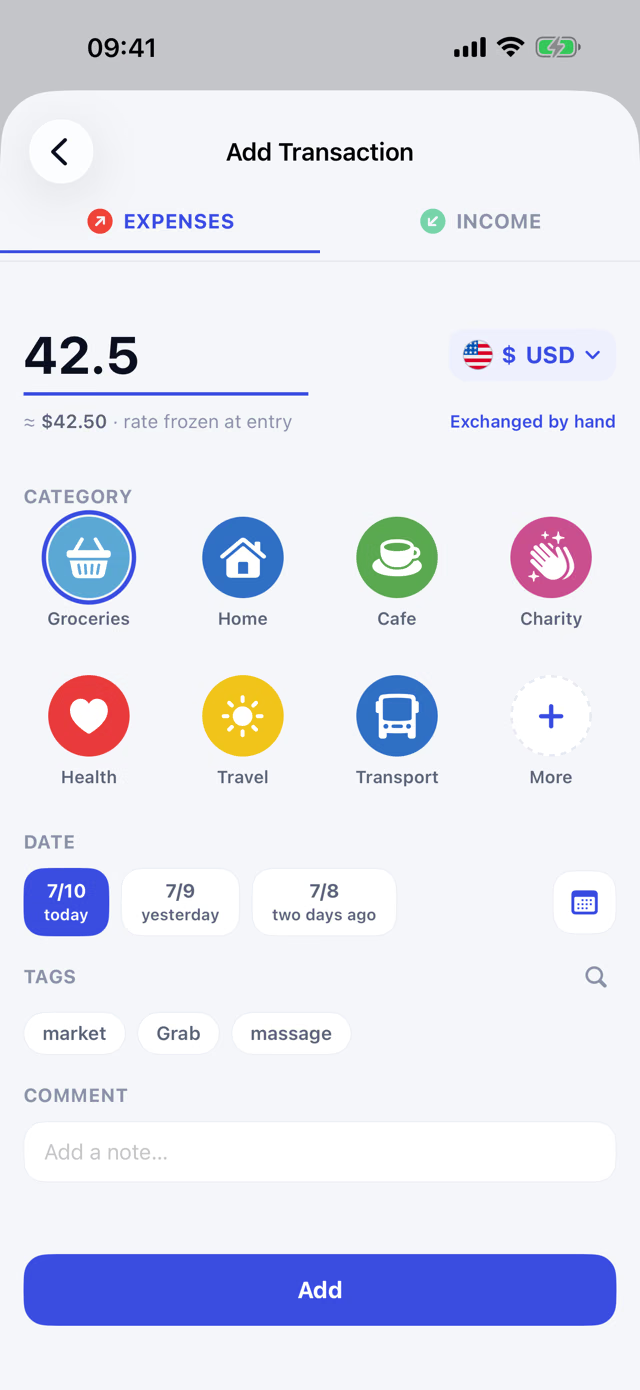
Tap to add an expense or income and the amount field is already focused, keyboard up, ready to type — no account field to fill in first, since Finsumo tracks one ledger, not several. A line under the amount updates live as you type: enter ฿1 850 and it reads something like "≈ $49.95 · rate frozen at entry" before you've even saved, so the conversion this page describes is visible the moment you're making it, not something you have to trust happened after the fact.
The + button starts a new transaction on the day you're viewing: page back to a past day and tap +, and the entry opens dated that day. On a week, month, year or custom range it starts on today if the range includes today, otherwise on the range's last day.
The currency chip next to the amount defaults to your active currency — free, with nothing else to set, for as many transactions as you like. Finsumo Pro opens that same chip into the full grouped picker described above, so a transaction can be entered directly in any other currency instead, frozen the same way the moment you save it. Below the chip, seven of your most-used categories sit as one-tap tiles; a "More" tile opens the full, searchable grid, with a tile at the end for creating a brand-new category on the spot if the one you want doesn't exist yet. Tags work the same way in reverse: start typing, and Finsumo either selects the exact tag you typed, creates it fresh if it doesn't exist, or falls back to the closest match — never leaving you with nothing selected. A date row offers Today and Yesterday as one-tap pills, plus a third pill for anything further back, opened from a small calendar icon.
Recurring transactions
Set it once, and it records itself
Turn on Recurring transactions in Settings — it is off by default — and Add Transaction gets a Repeats row; without the switch the row is hidden. Turning the switch off later only hides the row: rules you already have keep running.
Add a transaction as usual, then open the Repeats row and choose Daily, Weekly, Monthly or Yearly — every time, or every N: every 2 weeks, say — with an optional end date. Left alone, a transaction doesn't repeat. Settings → Recurring lists your rules; each one can be edited, paused or deleted.
Every due day filled in, each at its own day's rate
Due transactions are created automatically when you open Finsumo, and again when you return to it, for every due day up to today — so if you didn't open the app for a week, the missed ones are all filled in. Each occurrence is recorded at the exchange rate of its own day, the same frozen-rate rule as any other entry: each payment keeps the rate of the day it happened.
Never twice, never back from the dead
An occurrence is never duplicated, whether you relaunch the app or have several devices syncing through iCloud. Delete one occurrence and it stays deleted — it does not come back. Rules travel in your backups. Recurring transactions are free — Finsumo Pro is not needed.
Shortcuts to add, without opening the app
Three ways in, all free, none of them a dashboard
A Home Screen widget comes in two sizes: the small one is a single tap straight to the add screen; the medium one splits into two side-by-side buttons, one for an expense and one for income. A matching Control Center — or Lock Screen — control does the same from outside the Home Screen entirely, and a Siri phrase ("Add an expense in Finsumo") opens the identical screen through Siri or the Shortcuts app.
None of these show any spending — no totals, no recent entries, nothing pulled from your data. They're pure shortcuts to the entry screen, not a live view, and like the rest of the one-currency tier, none of them need Finsumo Pro.
Categories and tags, entirely yours
Named, ordered and merged your way
Categories come with sensible defaults, but every one of them — including the defaults — can be renamed, and expense categories can be dragged into whatever order you actually use them in, independently of the order for income categories. Delete a category that still has transactions in it and Finsumo asks which other category should take them over first, rather than leaving orphaned entries behind; the two catch-all categories reserved as that fallback destination can't themselves be deleted, since there would be nowhere left for their transactions to go.
Tags follow their own small set of tools in Settings: rename one, merge two tags that turned out to mean the same thing into a single tag across every transaction that used either, or delete one outright — with a confirmation first if it's still labelling anything.
Moving over from Money Manager
One import, your history intact
If your spending already lives in Money Manager, Finsumo reads a full backup file from it in a single step. The file itself is parsed and converted into Finsumo's own data on your device — the import itself uploads nothing about your transactions; pricing some of the older entries may still call on the same anonymous exchange-rate lookups any transaction relies on. Your expense and income history comes across with each entry's own original currency and date intact, so it's ready to be priced, viewed and lensed exactly like anything you enter in Finsumo from that point on, rather than arriving as a single flattened number that's lost which currency or day it actually happened on. Transfers between your own accounts are recognized and counted rather than dropped silently, though they don't come across as line items the way expenses and income do. The whole import is free — Finsumo Pro isn't needed to bring your history across.
Backups you control
Automatic, and always exportable on demand
Finsumo writes an automatic snapshot of your entire database once a day, in the background, with nothing to turn on. Settings also holds a manual "Backup now" for whenever you want one immediately, and "Restore from backup" for loading one back in — plus the option to point automatic backups at a folder of your choosing instead of the app's own storage, which can itself live in iCloud Drive if that's the folder you pick. Either way, a backup is a plain file Finsumo hands you; there's no server it uploads one to, because it doesn't run one. All of this — the daily snapshot, the manual export, the restore — is free, with no Finsumo Pro subscription required.
Backups kept inside Finsumo are deleted together with the app, so every now and then Finsumo offers, in a small prompt you can dismiss, to pick a folder in Files or iCloud Drive for them; Settings also says plainly when backups are only inside the app. Before every restore, Finsumo first saves a backup of your current data to your backup folder, so a wrong restore can always be undone.
Finsumo Pro adds one more way out: "Export CSV" shares your full transaction history as a CSV file — one row per transaction, values exactly as recorded, never re-priced — for opening in Numbers, Excel, or Google Sheets, with a progress spinner while the file is built. Everything above stays free either way; CSV export is the one part of backing up that needs a subscription.
iCloud sync, into your own iCloud
Always on and free
iCloud sync is always on — there is no switch. Finsumo keeps your transactions, categories, tags, accounts, budgets and weekly and monthly spending limits in step across every iPhone and iPad signed in to the same iCloud account. It uses Apple's CloudKit and your own private iCloud database: the developer has no access to it, and there is no Finsumo server and no Finsumo account. Without an iCloud account, Finsumo keeps working on the device only. It is free — Finsumo Pro is not needed.
A status line in Settings shows any problem — for example, when your iCloud storage is full — and when the last sync happened. The exchange-rate cache is not synced; each device keeps its own. Because sync is always on, deleting data and restoring a backup apply on every device that syncs. Sync is not a backup, so the daily snapshots above still matter.
After you reinstall Finsumo, the Home screen says it is restoring your data from iCloud until your data has arrived, instead of looking empty — and only when your iCloud really holds Finsumo data.
Crypto here is a unit, not custody
A number in your ledger, never a balance Finsumo holds
Recording a payment in USDT, USDC, USDe or Bitcoin in Finsumo works exactly like recording one in dollars or baht — it's a currency you spent in, converted and frozen the same way, and part of Finsumo Pro the same way any entry in a currency other than your active one is. Finsumo is a personal record-keeping app, not a wallet and not an exchange: it never holds, sends, receives or exchanges any actual cryptocurrency, and it isn't connected to a bank account, a crypto exchange, or a wallet of any kind. What it tracks is what something cost you, in whatever unit you paid in — nothing more.
Locking Finsumo itself
Face ID, Touch ID, or your own PIN — off by default
Turn on an app lock in Settings and Finsumo hides everything — including its own preview in the app switcher — behind Face ID or Touch ID. A quick switch to another app and back doesn't re-lock it; stepping away for a while does. It's free and off by default.
When Face ID or Touch ID isn't available, or doesn't recognise you, Finsumo falls back to its own 4-digit PIN instead of your device's passcode. You create the PIN the moment you turn the lock on and can change it anytime in Settings, which also means the lock can be turned on even on a device with no Face ID or Touch ID at all. Five wrong PINs in a row pause entry for 30 seconds, and each further miss pauses it a little longer, up to 5 minutes — Face ID and Touch ID still work during a pause, and nothing is ever erased. Only a salted hash of the PIN is stored, in the device's Keychain, and it never leaves the device.
What it costs
Finsumo is free to use, for good, for tracking in one active currency of your choice: every transaction, every category and tag, your whole history, every period view with its daily average, the month-vs-month comparison screen, monthly category budgets and weekly and monthly spending limits in any fiat currency, sorting the list and deleting with undo, an optional Face ID/Touch ID/PIN app lock, the Money Manager import, recurring transactions, backup and restore, iCloud sync across your iPhone and iPad, and the quick-add widget, Control Center control and Siri shortcut — none of that needs a subscription, and none of it ever expires or asks you to pay. Essential and discretionary marks, search across your whole history and repeating a past transaction are free too.
Finsumo Pro, an optional auto-renewing subscription, adds the parts of the app that involve more than one currency at once, plus a spending forecast: entering a transaction in a currency other than your active one, making Bitcoin, a stablecoin, or another cryptocurrency your active currency — whether picked from Home or Settings, any fiat currency stays free from either place — the Bitcoin/sats and stablecoin display lens, the hand-typed exchange-rate override, "Update historical rates" in Settings, CSV export of your full transaction history, the Bitcoin cost report, a budget or spending limit in a currency other than a fiat one, and the end-of-period forecast on Home. None of it shows up uninvited — it's never raised on first launch, and a locked control stays visible and tappable right where it is; reaching for it, or opening Settings → "Upgrade to Pro", is what brings up the paywall, in context, at the moment you actually want the feature.
Finsumo Pro comes in weekly, monthly, six-month and yearly lengths, and the paywall shows the current offer for your region. Each option on the paywall shows its price, what that works out to per month, and a "save N%" comparison against the shorter options — all computed live from the App Store price for your region, which is also where the exact number is shown, rather than repeated here where it could go stale.
Auto-renewing, through Apple. Payment is handled entirely by the App Store — Finsumo's developer never sees your card details. The subscription renews automatically unless auto-renew is turned off at least 24 hours before the current period ends; manage or cancel it any time in your Apple ID subscription settings. Full conditions are on the terms page.