
Multi-currency expense tracker · iPhone and iPad
Spend in several currencies and crypto. See one total that never re-prices itself.
Finsumo records what you actually paid — in dollars, baht, dong, USDT, USDC or Bitcoin — and reads the total back in whichever currency you think in. Every entry keeps the exchange rate it was made at, so a total from three months ago still reports the same number today.
- Currencies
- 153 fiat currencies, 84 crypto, 15 stablecoins
- Requires
- iPhone (iOS 26+) or iPad (iPadOS 26+)
- Storage
- On-device, synced through your own iCloud
- Accounts
- None
Why this one
Three things most expense trackers get wrong.
Every currency in one ledger
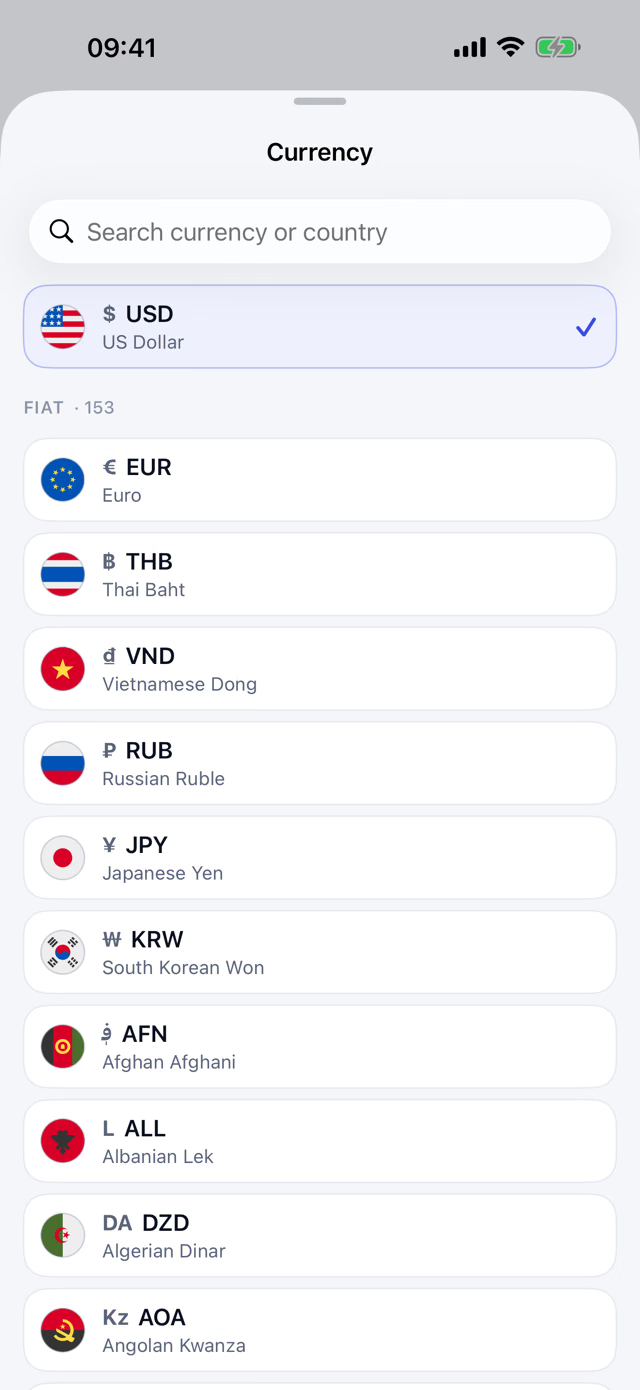
Pay for lunch in baht, rent in dollars, a flight in euros — they all go in the same book, each stored as the amount you really handed over. Switch the display currency whenever you like and the whole history re-reads in it. Finsumo offers 153 fiat currencies, each with its national flag, plus 84 cryptocurrencies — Bitcoin, Ethereum, Solana, Zcash, Dash and more — and 15 dollar stablecoins.
Crypto is not a separate app
Bitcoin, Ethereum, USDT, USDC and the rest are ordinary currencies here, sitting in the same ledger as the cash. A stablecoin payment is an expense, not a portfolio position — you shouldn't need a second app and a mental exchange rate to know what your month cost.
The rate freezes on the day you spent
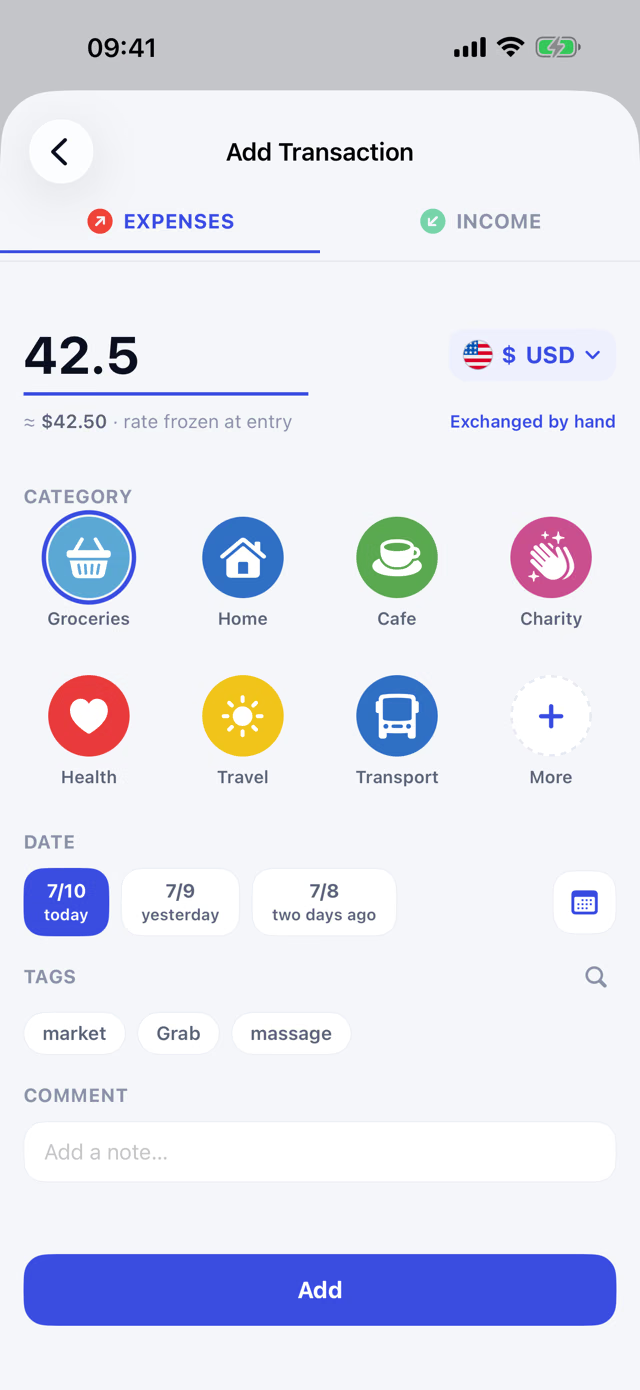
Each transaction locks in that day's market rate at the moment you enter it. Nothing in the past is ever recalculated, so last quarter's total is the same number this quarter, next year, and after you change your display currency.
What it looks like
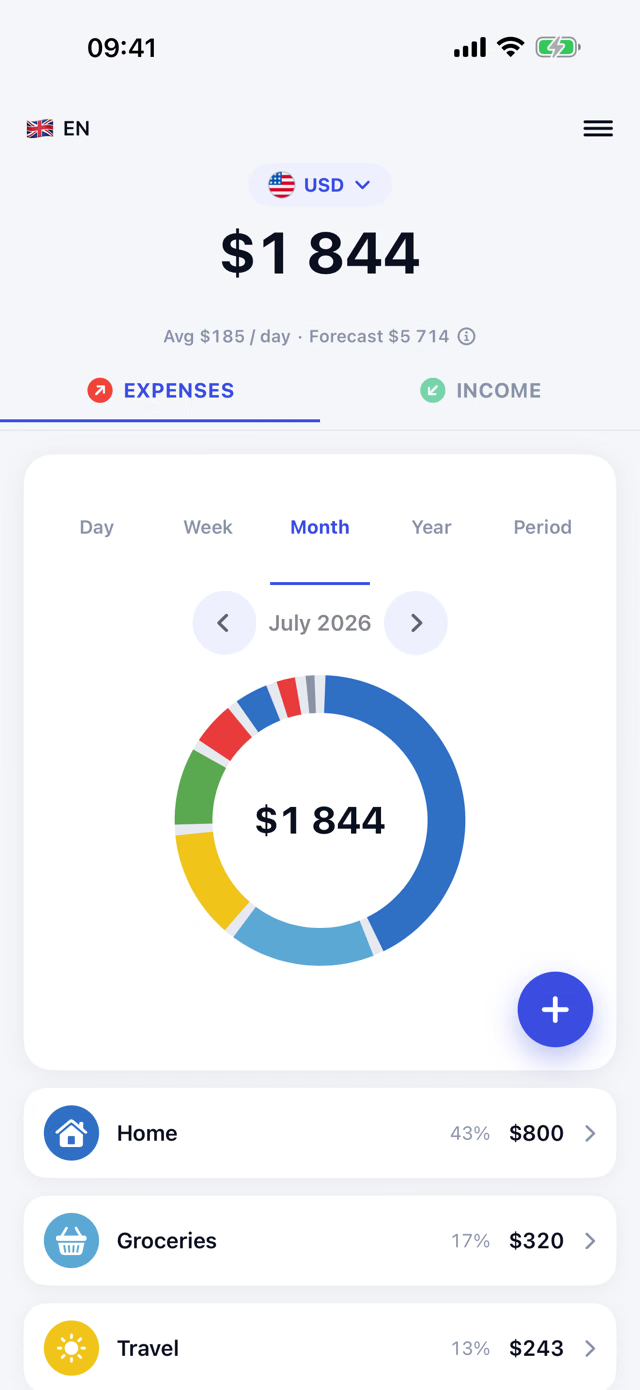
The currency above your total is a lens, not a setting you dread.
Tap it, pick another currency, and the same month is re-read in the new unit — categories, percentage shares and all — without a single stored value moving.
Made for people who move
If you spend across borders, your history is the thing that breaks.
Spend in a few countries for long enough and you hit the same wall: switch your tracker's base currency, and every past transaction is re-valued at today's exchange rate — a trip you paid for two years ago silently changes size because the rate moved since then. Finsumo doesn't do that. What you spent in Bangkok in March is still what you spent in Bangkok in March, whichever currency you ask the question in.
Moving over from Money Manager
If your spending already lives in Money Manager, Finsumo imports a full backup in one step — every transaction with its own currency and date, kept as history rather than flattened into a single number. The file is read on your device, and nothing about the import leaves it.
Bitcoin as a lens, not a ledger
Finsumo doesn't store a BTC amount on your transactions. A Bitcoin view is computed on demand from the frozen value and that day's historical BTC price — so "what did this cost in sats" is always answerable, without carrying crypto noise through every row of your data.
The quiet parts
Offline, backed up, and nobody else's business.
Works with no signal
Record a purchase on a plane and Finsumo uses the last rate it has cached, marking that entry so it can be quietly upgraded to the true historical rate for that exact day once you're back online — a one-time correction, not a running recalculation.
Backed up without being asked
Finsumo writes an automatic once-a-day snapshot in the background, and you can export one on demand from Settings at any time. The file is yours: it goes to on-device storage, or to a folder you pick — never uploaded anywhere by the app.
Categories and tags in your own words
Colour-coded categories for the shape of your spending, free-form tags for everything a category can't say. Both are yours to name; neither is a fixed list handed down by the app.
Sync across your iPhone and iPad, if you want
iCloud sync keeps your data in step across iPhones and iPads on the same iCloud account. It is always on, it is free, and it uses your own private iCloud — Finsumo's developer still sees nothing. Without an iCloud account, Finsumo keeps working on the device only.
Find it, repeat it, label it
Search your whole history at once, repeat a past transaction in one tap, and mark categories essential or discretionary to see how much of your spending was optional. All free.
Your transactions, categories and settings live in the app's on-device database — there is no account and no server, and Finsumo's developer never sees any of it. The one exception is iCloud sync, which is always on: your data syncs through your own private iCloud, which Finsumo's developer cannot access. The app makes network requests only to look up exchange rates: an open-source fiat-rate dataset for currencies, and CoinGecko for crypto and stablecoins — never anything about your transactions. Full detail is in the privacy policy.
Decided, not missing
What Finsumo doesn't do, and won't.
- NOBank account linking. No read-only feed of your bank account, no aggregation service, no third party ever sees your bank credentials. You type what you spent.
- NOAnalytics or tracking. No usage statistics, no crash reporting, no advertising identifiers.
- NOAds. Nothing sold, nothing shown that isn't your own data.
- NOAn account. No sign-up, no login, no server-side profile of any kind.
- NOPaywall on first launch. Every screen is usable right away. Finsumo Pro's multi-currency controls stay visible and explain themselves the moment you tap one — no upsell before you've even started.
What it costs
Free in one currency. Finsumo Pro unlocks the rest.
Finsumo is free to use for tracking in a single currency — unlimited transactions, categories and tags, full history, every period view including the period-over-period comparison, budgets and spending limits, Money Manager import, recurring transactions, backup and restore, iCloud sync across your iPhone and iPad, and the Home Screen widget. Finsumo Pro is an optional subscription that unlocks the multi-currency machinery, plus a spending forecast: entering a transaction in another currency, making Bitcoin, a stablecoin, or another cryptocurrency your active currency — any ordinary currency stays free to switch to, from Home or Settings — hand-typed rate overrides, updating historical rates, CSV export, the Bitcoin cost report, budgets in non-fiat currencies, and the end-of-period forecast. Pro comes in weekly, monthly, six-month and yearly lengths, and the paywall shows the current offer for your region. The exact price for your region is shown in the App Store listing and inside the app, rather than repeated here where it could go stale.
Auto-renewing, through Apple. Payment is handled entirely by the App Store; Finsumo's developer never sees your card details. Manage or cancel your Finsumo Pro subscription any time in your Apple ID subscription settings. Full conditions are on the terms page.
Get it now
Finsumo is live on the App Store.
Free to use in one currency, with Finsumo Pro unlocking multi-currency for anyone who needs it. The FAQ covers what comes up most — which currencies are supported, how the rate freeze works, backups, Finsumo Pro — and the feedback form goes straight to the person writing the code.